
- Популярные видео
- Авто
- Видео-блоги
- ДТП, аварии
- Для маленьких
- Еда, напитки
- Животные
- Закон и право
- Знаменитости
- Игры
- Искусство
- Комедии
- Красота, мода
- Кулинария, рецепты
- Люди
- Мото
- Музыка
- Мультфильмы
- Наука, технологии
- Новости
- Образование
- Политика
- Праздники
- Приколы
- Природа
- Происшествия
- Путешествия
- Развлечения
- Ржач
- Семья
- Сериалы
- Спорт
- Стиль жизни
- ТВ передачи
- Танцы
- Технологии
- Товары
- Ужасы
- Фильмы
- Шоу-бизнес
- Юмор
Master PowerApps: Build a Student Portal in Minutes!
Master PowerApps and build your own Student Management Portal in just minutes with our expert-led course! 🚀 Join us at KSR Datavision to enhance your skills in PowerApps, SharePoint, Power Automate, and more. Whether you're a beginner or a professional, this course is tailored to equip you with hands-on techniques to create data-driven apps seamlessly.
📅 Start Date: Ongoing
⏰ Timing: Flexible
👨🏫 Trainer: Industry Expert with extensive experience in Power Platform
Register now and take advantage of our exclusive one-week demo classes before deciding! Learn to integrate SharePoint as a data source, manage dynamic data with PowerApps, and implement automation with Power Automate—all while building a real-world Student Portal project.
💻 Take your tech career to the next level with our comprehensive training in Power BI, Microsoft Fabric, Azure, AWS, and more. For details, contact our course advisors or visit www.ksrdatavision.com.
#ksrdatavision #datascience #powerbi #microsoftfabric #aws #azure #TechCareers #DataVisualization #BusinessIntelligence #AI #GenerativeAI
#powerapps #sharepoint #embeddingpowerappsinsharepoint #powerappstutorial #powerappssharepointonline
#powerapps #sharepoint #integrationofdynamicsandsharepoint #microsoftdynamics365 #dynamics365
CHAPTERS:
00:00 - Overview of the Day
02:28 - Access Issue
03:17 - Why SharePoint Benefits
08:17 - Create SharePoint Site Steps
11:13 - Create SharePoint List Tutorial
14:35 - Designing Student Management Portal Database
20:45 - Creating Candidate Name Column
21:29 - Creating Candidate ID Column
23:28 - Creating Contact Number Column
27:12 - Creating Email Address Column
27:45 - Creating Date of Birth Column
28:15 - Creating Course Assigned Column
29:32 - Creating Gender Column
30:07 - Creating Student Type Column
30:43 - Creating Highest Qualification Column
40:39 - Maximum Columns in Canvas App
44:26 - Creating Canvas App in Power Apps
51:05 - Making App Responsive Design
52:18 - Adding Profile Image to App
57:51 - Connecting Data Source in App
1:00:21 - Doubt Session Q&A
1:06:05 - Collaborative App Development
1:13:20 - SharePoint vs Dataverse Comparison
1:17:40 - Morning Session Recap
1:19:30 - Placement Assistance Overview
1:22:09 - Certifications Information
1:23:42 - Introduction to Power Automate Desktop
1:24:50 - Let's Get Started with the Course
Видео Master PowerApps: Build a Student Portal in Minutes! канала KSR Datavizon
📅 Start Date: Ongoing
⏰ Timing: Flexible
👨🏫 Trainer: Industry Expert with extensive experience in Power Platform
Register now and take advantage of our exclusive one-week demo classes before deciding! Learn to integrate SharePoint as a data source, manage dynamic data with PowerApps, and implement automation with Power Automate—all while building a real-world Student Portal project.
💻 Take your tech career to the next level with our comprehensive training in Power BI, Microsoft Fabric, Azure, AWS, and more. For details, contact our course advisors or visit www.ksrdatavision.com.
#ksrdatavision #datascience #powerbi #microsoftfabric #aws #azure #TechCareers #DataVisualization #BusinessIntelligence #AI #GenerativeAI
#powerapps #sharepoint #embeddingpowerappsinsharepoint #powerappstutorial #powerappssharepointonline
#powerapps #sharepoint #integrationofdynamicsandsharepoint #microsoftdynamics365 #dynamics365
CHAPTERS:
00:00 - Overview of the Day
02:28 - Access Issue
03:17 - Why SharePoint Benefits
08:17 - Create SharePoint Site Steps
11:13 - Create SharePoint List Tutorial
14:35 - Designing Student Management Portal Database
20:45 - Creating Candidate Name Column
21:29 - Creating Candidate ID Column
23:28 - Creating Contact Number Column
27:12 - Creating Email Address Column
27:45 - Creating Date of Birth Column
28:15 - Creating Course Assigned Column
29:32 - Creating Gender Column
30:07 - Creating Student Type Column
30:43 - Creating Highest Qualification Column
40:39 - Maximum Columns in Canvas App
44:26 - Creating Canvas App in Power Apps
51:05 - Making App Responsive Design
52:18 - Adding Profile Image to App
57:51 - Connecting Data Source in App
1:00:21 - Doubt Session Q&A
1:06:05 - Collaborative App Development
1:13:20 - SharePoint vs Dataverse Comparison
1:17:40 - Morning Session Recap
1:19:30 - Placement Assistance Overview
1:22:09 - Certifications Information
1:23:42 - Introduction to Power Automate Desktop
1:24:50 - Let's Get Started with the Course
Видео Master PowerApps: Build a Student Portal in Minutes! канала KSR Datavizon
business collaboration crm portal dynamics 365 data integration digital transformation document management system dynamics 365 efficient document handling enterprise architecture integration of dynamics and sharepoint microsoft 365 microsoft dynamics 365 microsoft power apps power apps power apps portals power platform powerapps powerapps portal tutorial powerapps tutorial sharepoint sharepoint integration sharepoint permissions workflow automation
Комментарии отсутствуют
Информация о видео
29 апреля 2025 г. 9:59:38
01:25:17
Другие видео канала
 Introduction to Enrolled Agent (EA) & Career Opportunities
 Snowflake Data engineering & CortexAI
 Introduction to Snowflake Data Engineering
 Snowflake Data engineering & CortexAI
 Master AWS IAM: Secure User Access Made Simple 🚀 | Devops with Multi Cloud Session : 5
 5 Top Skills for Multi-Cloud Data Engineers to Get HIGH PAY in 2025
 Master EDA in Excel: The Key to Professional Data Analysis
 Standard vs. Itemized Deductions: How to Lower Your Taxes
 Introduction to Enrolled Agent (EA) & Career Opportunities
 Power Bi
 This AI Agent Trend is Real #agenticAI #mustlearn
 Microsoft Fabric: Master Data Flow Gen 1 Setup
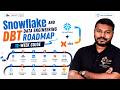 Snowflake and DBT Data Engineering Roadmap: 12-Week Guide
 How Microsoft Power Platform Boosted My Career | My Success Story with KSR
 RAG Explained: Fixing AI Hallucinations!
 The 3 BIGGEST Tech Job Scam Dangers You Need to Know | part 3
 IRS EA Exam Part 1: Syllabus, Scoring & Study Guide for Individuals
 May Batch: Generative AI, Power BI & Cloud Programs
