
- Популярные видео
- Авто
- Видео-блоги
- ДТП, аварии
- Для маленьких
- Еда, напитки
- Животные
- Закон и право
- Знаменитости
- Игры
- Искусство
- Комедии
- Красота, мода
- Кулинария, рецепты
- Люди
- Мото
- Музыка
- Мультфильмы
- Наука, технологии
- Новости
- Образование
- Политика
- Праздники
- Приколы
- Природа
- Происшествия
- Путешествия
- Развлечения
- Ржач
- Семья
- Сериалы
- Спорт
- Стиль жизни
- ТВ передачи
- Танцы
- Технологии
- Товары
- Ужасы
- Фильмы
- Шоу-бизнес
- Юмор
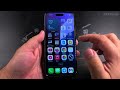
How to Stop Apps From Asking for Face ID or Passcode Part 3
How to make certain Apps do not require Face ID. Checking the Require Face ID option for apps or checking the settings of specific apps to not require FaceID unlock or passcode before using.
How to Stop Apps From Asking for Face ID or Passcode.
Amazon:*
iPhone Accessories https://rex.red/iPhone-accessories
iPhone Charger https://rex.red/iPhone-charger
iPhone Case https://rex.red/iPhone-case
iPhone Screen protector https://rex.red/iPhone-screen-protector
iPhone Magsafe https://rex.red/iphone-magsafe
iPhone Wallet https://rex.red/iphone-wallet
iPhone Usb c cable https://rex.red/iphone-usb-c-cable
Showing you on iOS 26.1 on iPhone 16 Pro Max Titanium Black 256 GB version Global model A3296 - MYWV3ZD/A
If you have an app asking for Face ID or your passcode every single time you open it, and you don’t want to require Face ID every time you open some apps I can show you how to change that. In this video, I'll explain how to make certain apps not require Face ID so you can access them faster.
If an app asks for biometric login, and then it just keeps asking, even for simple tasks. I'll show you where to find the settings for this. You can look inside the app's own settings menu. For many apps, especially banking or password manager apps, there is often a privacy or security section where you can toggle off features like "Require Face ID on Launch" or "Always Require Passcode."
Check the settings of specific apps to not require FaceID unlock. Sometimes the setting is called "Biometric Login" or "Use Face ID." If you turn that off, the app will typically just use your account password next time, or might not ask for any authentication at all for basic features.
You learn in this video how to turn off Face ID for certain apps. If you want an app to stop using Face ID or Touch ID, you need to manage its internal settings or check for the require Face ID option for the app you’re trying to prevent Face ID from showing and or asking for a passcode every time you open the app.
Watch the video carefully without skipping to see all the steps needed in this video.
Subscribe and click the Bell to watch more videos.
IONHowTo https://www.youtube.com/channel/UCx4Qbp3iC97kQzj7e7g7slg
RedNumberONE https://m.youtube.com/channel/UCYdm-YlcfOvCbKeh60EkMZg
Buy merch https://store.ionhowto.com/
Join this channel to get access to perks:
https://www.youtube.com/channel/UCx4Qbp3iC97kQzj7e7g7slg/join
Any questions?
Feel free to ask in the comments section below.
Subscribe, Like and SHARE this video with your friends!
We earn money from qualifying purchases using our affiliate links.
Affiliate links are marked with a star. *
When you use our * links, you support this channel.
As an Amazon Associate I earn from qualifying purchases.
Website https://www.ionhowto.com/
Food Recipes: https://www.rednumberone.com/
Видео How to Stop Apps From Asking for Face ID or Passcode Part 3 канала ION HowTo
How to Stop Apps From Asking for Face ID or Passcode.
Amazon:*
iPhone Accessories https://rex.red/iPhone-accessories
iPhone Charger https://rex.red/iPhone-charger
iPhone Case https://rex.red/iPhone-case
iPhone Screen protector https://rex.red/iPhone-screen-protector
iPhone Magsafe https://rex.red/iphone-magsafe
iPhone Wallet https://rex.red/iphone-wallet
iPhone Usb c cable https://rex.red/iphone-usb-c-cable
Showing you on iOS 26.1 on iPhone 16 Pro Max Titanium Black 256 GB version Global model A3296 - MYWV3ZD/A
If you have an app asking for Face ID or your passcode every single time you open it, and you don’t want to require Face ID every time you open some apps I can show you how to change that. In this video, I'll explain how to make certain apps not require Face ID so you can access them faster.
If an app asks for biometric login, and then it just keeps asking, even for simple tasks. I'll show you where to find the settings for this. You can look inside the app's own settings menu. For many apps, especially banking or password manager apps, there is often a privacy or security section where you can toggle off features like "Require Face ID on Launch" or "Always Require Passcode."
Check the settings of specific apps to not require FaceID unlock. Sometimes the setting is called "Biometric Login" or "Use Face ID." If you turn that off, the app will typically just use your account password next time, or might not ask for any authentication at all for basic features.
You learn in this video how to turn off Face ID for certain apps. If you want an app to stop using Face ID or Touch ID, you need to manage its internal settings or check for the require Face ID option for the app you’re trying to prevent Face ID from showing and or asking for a passcode every time you open the app.
Watch the video carefully without skipping to see all the steps needed in this video.
Subscribe and click the Bell to watch more videos.
IONHowTo https://www.youtube.com/channel/UCx4Qbp3iC97kQzj7e7g7slg
RedNumberONE https://m.youtube.com/channel/UCYdm-YlcfOvCbKeh60EkMZg
Buy merch https://store.ionhowto.com/
Join this channel to get access to perks:
https://www.youtube.com/channel/UCx4Qbp3iC97kQzj7e7g7slg/join
Any questions?
Feel free to ask in the comments section below.
Subscribe, Like and SHARE this video with your friends!
We earn money from qualifying purchases using our affiliate links.
Affiliate links are marked with a star. *
When you use our * links, you support this channel.
As an Amazon Associate I earn from qualifying purchases.
Website https://www.ionhowto.com/
Food Recipes: https://www.rednumberone.com/
Видео How to Stop Apps From Asking for Face ID or Passcode Part 3 канала ION HowTo
Комментарии отсутствуют
Информация о видео
3 января 2026 г. 20:01:40
00:00:21
Другие видео канала
 Installation of Ugreen HDMI Bi directional Switch Part 3
 Parkside 31 Pieces Socket Set PDSS31 01 Part 1
 How to Remove the Flashlight Button from iPhone Lock Screen Part 2
 iPad Pro M5 Remove Flashlight Button from Control Center Part 1
 How to Touch Grass a Tutorial Part 2
 iPad Pro M5 Remove Flashlight Button from Control Center Part 2
 How to Remove the Flashlight Button from iPhone Lock Screen Part 1
 iPad Pro M5 How to Disable Flash for Alerts and Notifications Part 2
 Installation of Ugreen HDMI Bi directional Switch Part 2
 Unboxing Ugreen HDMI Bi directional Switch CM311 70607 4K 60Hz HDCP 2.3 2 in 1 Part 2
 How to View Hidden Photos on iPhone
 RTX5080 on PCIe 4.0 MB Tests DaVinci Resolve Studio 20 Faster Render Speed
 How to Recover Deleted Photos on iPhone
 How to Avoid Touching Grass Part 2
 Smart Battery 12Ah 20V X20V Lidl Parkside Smart PAPS 2012 A1 240Wh Part 1
 How to change code on the key lock box STANDERS
 iPad Pro M5 How to Enable Flash for Alerts and Notifications Part 3
 3M Duct Tape Signal Color Bright Neon Orange Green and Yellow 48mm x 10m Part 1
 RTX5080 in PCIe 4.0 Motherboard Tests Furmark
 How to Unhide Photos on iPhone Part 3
 Set of Shielded Cat 6A RJ45 crimp connectors LEXMAN
