
- Популярные видео
- Авто
- Видео-блоги
- ДТП, аварии
- Для маленьких
- Еда, напитки
- Животные
- Закон и право
- Знаменитости
- Игры
- Искусство
- Комедии
- Красота, мода
- Кулинария, рецепты
- Люди
- Мото
- Музыка
- Мультфильмы
- Наука, технологии
- Новости
- Образование
- Политика
- Праздники
- Приколы
- Природа
- Происшествия
- Путешествия
- Развлечения
- Ржач
- Семья
- Сериалы
- Спорт
- Стиль жизни
- ТВ передачи
- Танцы
- Технологии
- Товары
- Ужасы
- Фильмы
- Шоу-бизнес
- Юмор
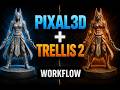
Trellis 2 vs Pixal3D in ComfyUI — Which FREE AI 3D Model Wins? (Full Comparison)
🔥 Trellis 2 vs Pixal3D — ComfyUI FREE AI 3D Model Comparison! In this tutorial, I test both
of the best local AI 3D generation models side by side using the same images and same settings
in ComfyUI, then compare all results in Blender.
🎯 What You'll Learn:
✅ How to set up Pixal3D & Trellis 2 in ComfyUI
✅ Best settings for 3D model generation (Steps, Resolution, Face Count)
✅ How to use ComfyUI batch queue to generate multiple models automatically
✅ Side-by-side comparison in Blender (Solid mode & Material Preview)
✅ Which AI wins for Mesh Quality vs Texture Quality
━━━━━━━━━━━━━━━━━━━━━━━━━━━━━━
📥 DOWNLOAD LINKS ━━━━━━━━━━━━━━━━━━━━━━━━━━━━━━
🔗 Trellis 2 Install: https://youtu.be/hq1CQxLCcE8?si=dvlYZ13dFUfsej5W
🔗 Pixal3D Install: https://youtu.be/C7xdV53oczw?si=gVyesmvhJ9l2SgfX
🔗 Workflow File & Reference Images Pack: https://drive.google.com/drive/folders/1MJE-TNejmYHBC8RnBy1qRRR9klG0LWng?usp=drive_link
━━━━━━━━━━━━━━━━━━━━━━━━━━━
⏱️ TIMESTAMPS / CHAPTERS
━━━━━━━━━━━━━━━━━━━━━━━━━━━
0:00 – Intro & Setup Requirements
1:06 – Load the Workflow in ComfyUI
1:40 – Running Pixal3D — First Model (Character)
1:54 – Result 1: Pixal3D Output Review
3:03 – Dragon Result Analysis
3:50 – Robot Result & AI Progress Discussion
4:30 – Human Model Result (Surprising!)
5:07 – Switching to Trellis 2 — How to Change Model
5:25 – Using Batch Queue in ComfyUI
6:10 – All Pixal3D Models Done — Overview
6:41 – Importing Everything into Blender
7:10 – Model 1 Comparison: Assassin Character
7:35 – Model 2 Comparison: Dragon
8:00 – Model 3 Comparison: Robot (Hard Surface)
8:23 – Model 4 Comparison: Human Bust
8:43 – Model 5 Comparison: Chair (Simple Object)
9:02 – Model 6 Comparison: Concept House
9:26 – Final Verdict & My Opinion
9:49 – Outro & Subscribe
━━━━━━━━━━━━━━━━━━━━━━━━━━━━
⚙️ SETTINGS USED IN THIS VIDEO
━━━━━━━━━━━━━━━━━━━━━━━━━━━----
• Steps: 25
• Shape Generator Resolution: 512
• Other Nodes Resolution: 1024
• Target Face Count: 1,000,000
• GPU: NVIDIA RTX 3060 (12GB VRAM)
• Average Generation Time: ~5–6 minutes per model
━━━━━━━━━━━━━━━━━━━━━━━
🏆 FINAL VERDICT
━━━━━━━━━━━━━━━
✅ Pixal3D → Better MESH quality
✅ Trellis 2 → Better TEXTURE quality
Both models are completely FREE and run locally!
Which one do YOU prefer? Comment below 👇
━━━━━━━━━━━━━━━━━━━━━━━━━━━
🔔 SUBSCRIBE FOR MORE AI TUTORIALS!━━━━━━━━━━━━━━━━━━━━━━━━━
If this helped you, please LIKE 👍, SHARE 🔁, and SUBSCRIBE 🔔Tell me in the comments which tutorial you want to see next!━━━━━━━━━━━━━━━━━━━━━━━━━━━
🔎 KEYWORDS / TOPICS COVERED
━━━━━━━━━━━━
ComfyUI image to 3D, Trellis 2 tutorial, Pixal3D ComfyUI, free AI 3D model generator,local AI 3D generation, image to 3D free, Microsoft Trellis 2, AI 3D mesh quality,Blender AI model import, ComfyUI workflow tutorial, AI 3D for game development,free 3D model generation, RTX 3060 AI generation, ComfyUI batch generation#ComfyUI #Trellis2 #Pixal3D #AIGeneration #ImageTo3D
Видео Trellis 2 vs Pixal3D in ComfyUI — Which FREE AI 3D Model Wins? (Full Comparison) канала Comfyui Tutorial
of the best local AI 3D generation models side by side using the same images and same settings
in ComfyUI, then compare all results in Blender.
🎯 What You'll Learn:
✅ How to set up Pixal3D & Trellis 2 in ComfyUI
✅ Best settings for 3D model generation (Steps, Resolution, Face Count)
✅ How to use ComfyUI batch queue to generate multiple models automatically
✅ Side-by-side comparison in Blender (Solid mode & Material Preview)
✅ Which AI wins for Mesh Quality vs Texture Quality
━━━━━━━━━━━━━━━━━━━━━━━━━━━━━━
📥 DOWNLOAD LINKS ━━━━━━━━━━━━━━━━━━━━━━━━━━━━━━
🔗 Trellis 2 Install: https://youtu.be/hq1CQxLCcE8?si=dvlYZ13dFUfsej5W
🔗 Pixal3D Install: https://youtu.be/C7xdV53oczw?si=gVyesmvhJ9l2SgfX
🔗 Workflow File & Reference Images Pack: https://drive.google.com/drive/folders/1MJE-TNejmYHBC8RnBy1qRRR9klG0LWng?usp=drive_link
━━━━━━━━━━━━━━━━━━━━━━━━━━━
⏱️ TIMESTAMPS / CHAPTERS
━━━━━━━━━━━━━━━━━━━━━━━━━━━
0:00 – Intro & Setup Requirements
1:06 – Load the Workflow in ComfyUI
1:40 – Running Pixal3D — First Model (Character)
1:54 – Result 1: Pixal3D Output Review
3:03 – Dragon Result Analysis
3:50 – Robot Result & AI Progress Discussion
4:30 – Human Model Result (Surprising!)
5:07 – Switching to Trellis 2 — How to Change Model
5:25 – Using Batch Queue in ComfyUI
6:10 – All Pixal3D Models Done — Overview
6:41 – Importing Everything into Blender
7:10 – Model 1 Comparison: Assassin Character
7:35 – Model 2 Comparison: Dragon
8:00 – Model 3 Comparison: Robot (Hard Surface)
8:23 – Model 4 Comparison: Human Bust
8:43 – Model 5 Comparison: Chair (Simple Object)
9:02 – Model 6 Comparison: Concept House
9:26 – Final Verdict & My Opinion
9:49 – Outro & Subscribe
━━━━━━━━━━━━━━━━━━━━━━━━━━━━
⚙️ SETTINGS USED IN THIS VIDEO
━━━━━━━━━━━━━━━━━━━━━━━━━━━----
• Steps: 25
• Shape Generator Resolution: 512
• Other Nodes Resolution: 1024
• Target Face Count: 1,000,000
• GPU: NVIDIA RTX 3060 (12GB VRAM)
• Average Generation Time: ~5–6 minutes per model
━━━━━━━━━━━━━━━━━━━━━━━
🏆 FINAL VERDICT
━━━━━━━━━━━━━━━
✅ Pixal3D → Better MESH quality
✅ Trellis 2 → Better TEXTURE quality
Both models are completely FREE and run locally!
Which one do YOU prefer? Comment below 👇
━━━━━━━━━━━━━━━━━━━━━━━━━━━
🔔 SUBSCRIBE FOR MORE AI TUTORIALS!━━━━━━━━━━━━━━━━━━━━━━━━━
If this helped you, please LIKE 👍, SHARE 🔁, and SUBSCRIBE 🔔Tell me in the comments which tutorial you want to see next!━━━━━━━━━━━━━━━━━━━━━━━━━━━
🔎 KEYWORDS / TOPICS COVERED
━━━━━━━━━━━━
ComfyUI image to 3D, Trellis 2 tutorial, Pixal3D ComfyUI, free AI 3D model generator,local AI 3D generation, image to 3D free, Microsoft Trellis 2, AI 3D mesh quality,Blender AI model import, ComfyUI workflow tutorial, AI 3D for game development,free 3D model generation, RTX 3060 AI generation, ComfyUI batch generation#ComfyUI #Trellis2 #Pixal3D #AIGeneration #ImageTo3D
Видео Trellis 2 vs Pixal3D in ComfyUI — Which FREE AI 3D Model Wins? (Full Comparison) канала Comfyui Tutorial
Trellis 2 image to 3D AI 3D model ComfyUI tutorial free AI 3D local AI 3D Microsoft Trellis 2 3D generation AI ComfyUI workflow AI mesh generation Blender AI import image to 3D free ComfyUI 3D workflow AI 3D comparison best free 3D AI ComfyUI nodes 3D model AI Trellis2 ComfyUI comfyui custom nodes image to 3d image to 3d model free 3d ai blender image to 3d model ai blender tutorial open source AI AI image to 3D free AI tools pixal3d
Комментарии отсутствуют
Информация о видео
22 июня 2026 г. 19:49:28
00:10:07
Другие видео канала
 LTX 2.3 ComfyUI | Free Image To Video Generator On Low Vram
 Trellis 2 Model Loading Errors In ComfyUI
 FREE AI Music in ComfyUI! Stable Audio 3.0 Text to Music
 Pixal3d Comfyui: Create Realistic 3D Sculptures Under 8GB VRAM!
 Remove Background FREE in ComfyUI (Better Than Photoshop!)
 Trellis 2 on 6GB VRAM | ComfyUI Tutorial
 Image to 3D Character in Seconds | Trellis 2 + ComfyUI
 Pixal3D GGUF in ComfyUI — Image to 3D with Only 6GB VRAM!
 Trellis 2 on ONLY 4GB VRAM! Best Open-Source 3D AI Generator
 Trellis 2 ComfyUI Workflow – Image to 3D in Minutes
 VibeVoice ComfyUI Install Tutorial (2026) | How To Install Vibevoice
 ComfyUI Install Tutorial 2026 — Beginners Start Here!
 Pixal3D + Trellis 2 ComfyUI Workflow – FREE AI Image to 3D
 How To Install ComfyUI Manager (2026 Easy Guide)
 Qwen3 TTS ComfyUI Tutorial | Install & Generate AI Voice Locally
 How To Update ComfyUI New Version 2026
 Turn ANY Image into 3D Sculpture FREE with AI | Hunyuan3D + ComfyUI Full Tutorial 2026
