
- Популярные видео
- Авто
- Видео-блоги
- ДТП, аварии
- Для маленьких
- Еда, напитки
- Животные
- Закон и право
- Знаменитости
- Игры
- Искусство
- Комедии
- Красота, мода
- Кулинария, рецепты
- Люди
- Мото
- Музыка
- Мультфильмы
- Наука, технологии
- Новости
- Образование
- Политика
- Праздники
- Приколы
- Природа
- Происшествия
- Путешествия
- Развлечения
- Ржач
- Семья
- Сериалы
- Спорт
- Стиль жизни
- ТВ передачи
- Танцы
- Технологии
- Товары
- Ужасы
- Фильмы
- Шоу-бизнес
- Юмор
How to Buy and Sell Any Coin on Bybit Using USDT | Beginner Guide (Full Tutorial)
Are you wondering how to buy or sell any coin on Bybit using the USDT you purchased via P2P? In this step-by-step tutorial, I walk you through the entire process — from transferring USDT from your Funding wallet to your Unified Trading wallet, to trading it for any coin (like CORE), and then selling it back to USDT.
What you’ll learn in this video:
How to transfer USDT from the Funding wallet to the Unified Trading wallet on Bybit
How to buy any coin using Market order
How to transfer your purchased coin back to your Funding wallet
How to sell your coin and convert it back to USDT
The difference between Market and Limit orders
Bonus: How to prepare your coin for withdrawal or future trades
If you're new to crypto or Bybit, this video is a must-watch. Make sure to check the link to the P2P tutorial below if you haven’t bought USDT yet!
Related Videos:
How to Buy USDT Using P2P on Bybit (Beginner Guide)
Timestamps:
00:00 – Intro: How to Buy and Sell Coins on Bybit
00:50 – Recap: Buying USDT via P2P
01:42 – Navigating to the Funding Wallet
02:30 – Understanding Funding vs. Unified Trading Wallet
04:10 – How to Transfer USDT to the Unified Trading Wallet
06:00 – Going to the Trade Section
07:05 – Choosing the Coin Pair (e.g., CORE/USDT)
08:10 – Market vs. Limit Order Explained
09:25 – Buying Your Coin with USDT
10:45 – How to Transfer Your Purchased Coin Back to Funding Wallet
12:00 – Selling the Coin to Convert Back to USDT
13:20 – Final Tips & Outro
Don't forget to:
Like, Comment, Subscribe & Turn on the Notification Bell so you don’t miss future tutorials!
Видео How to Buy and Sell Any Coin on Bybit Using USDT | Beginner Guide (Full Tutorial) канала Maths Atoka
What you’ll learn in this video:
How to transfer USDT from the Funding wallet to the Unified Trading wallet on Bybit
How to buy any coin using Market order
How to transfer your purchased coin back to your Funding wallet
How to sell your coin and convert it back to USDT
The difference between Market and Limit orders
Bonus: How to prepare your coin for withdrawal or future trades
If you're new to crypto or Bybit, this video is a must-watch. Make sure to check the link to the P2P tutorial below if you haven’t bought USDT yet!
Related Videos:
How to Buy USDT Using P2P on Bybit (Beginner Guide)
Timestamps:
00:00 – Intro: How to Buy and Sell Coins on Bybit
00:50 – Recap: Buying USDT via P2P
01:42 – Navigating to the Funding Wallet
02:30 – Understanding Funding vs. Unified Trading Wallet
04:10 – How to Transfer USDT to the Unified Trading Wallet
06:00 – Going to the Trade Section
07:05 – Choosing the Coin Pair (e.g., CORE/USDT)
08:10 – Market vs. Limit Order Explained
09:25 – Buying Your Coin with USDT
10:45 – How to Transfer Your Purchased Coin Back to Funding Wallet
12:00 – Selling the Coin to Convert Back to USDT
13:20 – Final Tips & Outro
Don't forget to:
Like, Comment, Subscribe & Turn on the Notification Bell so you don’t miss future tutorials!
Видео How to Buy and Sell Any Coin on Bybit Using USDT | Beginner Guide (Full Tutorial) канала Maths Atoka
Комментарии отсутствуют
Информация о видео
27 мая 2024 г. 21:27:09
00:15:53
Другие видео канала
 Fundamental Physics | PHY101 | EXAM QUESTION AND ANSWERS
 Reset Apple ID Without Email Access (New Method)
 Live highlight
 Real Analysis Prove that so many failed
 Solve Initial Value Problem Using Laplace Transform | Step-by-Step Guide with Cos(5t)
 Solving indices questions with calculator
 Olympiad Math Qatar 🇶🇦
 Top 10 African countries with the most beautiful women
 Olympiad Math For Italian Students | Can you do the trick?
 Population Growth & Decay | Application of First-Order Differential Equations
 MATH 812 | Mathematical modelling | Question 2
 National Anthem #nationalanthem #nigeria #viralvideo #fypシ
 How to make subject of formula #maths #mathsolympiad #education #olympiadmathematics
 Calculus and coordinate Geometry past questions and answers part 2
 Olympiad Mathematics | a beautiful logarithm equation | Africa can you Tri this?
 How to Find the Minimum Value of a Function | Calculus Made Easy (Step-by-Step)
 Density | Relative Density | upthrust
 Save money #viralvideo #savemoney #fypシ
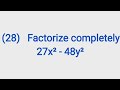 OLYMPIAD MATHS QUESTION | Factorization
 This Setting Saves Your Phone Battery – Don’t Skip This!
