
- Популярные видео
- Авто
- Видео-блоги
- ДТП, аварии
- Для маленьких
- Еда, напитки
- Животные
- Закон и право
- Знаменитости
- Игры
- Искусство
- Комедии
- Красота, мода
- Кулинария, рецепты
- Люди
- Мото
- Музыка
- Мультфильмы
- Наука, технологии
- Новости
- Образование
- Политика
- Праздники
- Приколы
- Природа
- Происшествия
- Путешествия
- Развлечения
- Ржач
- Семья
- Сериалы
- Спорт
- Стиль жизни
- ТВ передачи
- Танцы
- Технологии
- Товары
- Ужасы
- Фильмы
- Шоу-бизнес
- Юмор
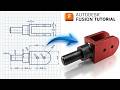
Fusion 360 From Zero | Beginner Step-by-Step Modeling Tutorial #31
2D Sketch : https://www.3dmechanism.com/post/3d-exercise-31
In this tutorial we'll use the features:
🧱 Extrude
Extrude is the most fundamental command for turning a 2D sketch into a 3D solid. It works by extending a sketch profile in a straight line, either to add material (a "join" operation) or to remove material (a "cut" operation).
📐 Rib
The Rib command is used to create a thin-walled support feature that adds strength and rigidity to a part. You create a rib by sketching a single line (or multiple lines) that represents the path of the rib, and the command automatically creates the feature with a specified thickness, typically perpendicular to the sketch plane. Ribs are essential for reinforcing walls and preventing them from bending under load.
🔄 Mirror
The Mirror command is used to create a symmetrical copy of a feature, body, or component. It's a powerful tool for designing symmetrical parts, as you can model one half and then mirror it to create the other. You select the object to be copied and the plane or face to mirror it across.
---------------------------------------------------------------------------------------------
Rating, commenting, subscribing and sharing are always appreciated!!
----------------------------------------------------------------------------------------------
▬▬▬▬▬▬▬▬▬▬▬▬▬▬▬▬▬▬▬▬▬▬▬▬▬▬▬▬▬▬
Follow Us On:
Instagram : https://www.instagram.com/engbcruz/
YouTube: https://www.youtube.com/channel/UCzG_tEIt69-dFjtYTTo0tCA
#Education
#Fusion360
#Fusion360tutorial
#cad
Видео Fusion 360 From Zero | Beginner Step-by-Step Modeling Tutorial #31 канала Fusion 360 Mastery
In this tutorial we'll use the features:
🧱 Extrude
Extrude is the most fundamental command for turning a 2D sketch into a 3D solid. It works by extending a sketch profile in a straight line, either to add material (a "join" operation) or to remove material (a "cut" operation).
📐 Rib
The Rib command is used to create a thin-walled support feature that adds strength and rigidity to a part. You create a rib by sketching a single line (or multiple lines) that represents the path of the rib, and the command automatically creates the feature with a specified thickness, typically perpendicular to the sketch plane. Ribs are essential for reinforcing walls and preventing them from bending under load.
🔄 Mirror
The Mirror command is used to create a symmetrical copy of a feature, body, or component. It's a powerful tool for designing symmetrical parts, as you can model one half and then mirror it to create the other. You select the object to be copied and the plane or face to mirror it across.
---------------------------------------------------------------------------------------------
Rating, commenting, subscribing and sharing are always appreciated!!
----------------------------------------------------------------------------------------------
▬▬▬▬▬▬▬▬▬▬▬▬▬▬▬▬▬▬▬▬▬▬▬▬▬▬▬▬▬▬
Follow Us On:
Instagram : https://www.instagram.com/engbcruz/
YouTube: https://www.youtube.com/channel/UCzG_tEIt69-dFjtYTTo0tCA
#Education
#Fusion360
#Fusion360tutorial
#cad
Видео Fusion 360 From Zero | Beginner Step-by-Step Modeling Tutorial #31 канала Fusion 360 Mastery
Комментарии отсутствуют
Информация о видео
12 мая 2026 г. 21:00:32
00:06:48
Другие видео канала
 Fusion 360 From Zero | Expert Tutorial Step-by-Step Ice Cube Tray
 Fusion 360 From Zero | Beginner Step-by-Step Modeling Tutorial #43
 Can You Model This? Fusion 360 Challenge - Catics 3D01-03
 Fusion 360 From Zero | Beginner Step-by-Step Tutorial 114
 Fusion 360 From Zero | Beginner Step-by-Step Modeling Tutorial #27
 Fusion 360 From Zero | Beginner Step-by-Step Modeling Tutorial #02
 Fusion 360 From Zero | DRAFT - Taper Angle Feature Tutorial #15
 Fusion 360 From Zero | Beginner Step-by-Step Tutorial
 Fusion 360 From Zero | Beginner Step-by-Step Modeling Tutorial #26
 Fusion 360 From Zero | Beginner Step-by-Step Modeling Tutorial #25
 Autodesk Fusion - 2D SKETCH CHALLENGE 2
 Fusion 360 From Zero | Beginner Step-by-Step Modeling Tutorial #18
 Sketch to 3D Print in Fusion 360 | Self-Locking Towel Hanger
 Fusion 360 From Zero | Beginner Step-by-Step Modeling Tutorial #03
 Fusion 360 Sheet Metal Practice Series – Exercise #5
 Fusion 360 From Zero | Expert Tutorial Step-by-Step
 Fusion 360 From Zero | Beginner Step-by-Step Tutorial Ice Pick
 Fusion 360 From Zero | Beginner Step-by-Step Modeling Tutorial #44
 Fusion 360 From Zero | Beginner Step-by-Step Modeling Tutorial #48
 Fusion 360 Sheet Metal Practice Series – Exercise #2
