
- Популярные видео
- Авто
- Видео-блоги
- ДТП, аварии
- Для маленьких
- Еда, напитки
- Животные
- Закон и право
- Знаменитости
- Игры
- Искусство
- Комедии
- Красота, мода
- Кулинария, рецепты
- Люди
- Мото
- Музыка
- Мультфильмы
- Наука, технологии
- Новости
- Образование
- Политика
- Праздники
- Приколы
- Природа
- Происшествия
- Путешествия
- Развлечения
- Ржач
- Семья
- Сериалы
- Спорт
- Стиль жизни
- ТВ передачи
- Танцы
- Технологии
- Товары
- Ужасы
- Фильмы
- Шоу-бизнес
- Юмор
STATS_PEARSON Function Reference in Google Sheets | Pearson Correlation Matrix Documentation
This video is reference documentation for the STATS_PEARSON function in the ALS Stats Google Sheets add-on, focused on Pearson correlation reports and correlation matrices.
It demonstrates concrete function calls and outputs for STATS_PEARSON in Google Sheets without explaining statistical theory or providing a step-by-step tutorial.
00:00 Function overview and scope
00:27 Basic two-column Pearson test
00:44 Parameters description
01:11 Output structure and meaning
02:31 Full correlation matrix for all tests
02:42 Explain wildcard matrix changes
03:38 Select a subset via negative rules
03:50 Explain negative rule changes
04:19 Use regex to select columns by name
04:31 Explain regex selection changes
04:59 Change confidence level of intervals
05:09 Explain confidence level change
05:35 Switch to one-sided greater alternative
05:45 Explain greater alternative change
05:59 Switch to one-sided less alternative
06:08 Explain less alternative change
06:20 Typical errors and constraints
06:26 Unknown column name in colFilter
07:03 Too few numeric columns after filtering
07:37 Invalid confidence level outside 0–1
08:12 Invalid alternative hypothesis value
08:50 Summary
The video shows how STATS_PEARSON behaves for a two-column Pearson r report, then for a full 4×4 correlation matrix when using a wildcard column selector. It documents name-based filters, negative rules, and regex-based column selection, as well as how changes to ciLevel and the alternative parameter (two-sided, greater, less) affect confidence intervals and p-values.
The scope is limited to function behavior, parameters, output structure, and typical error messages (unknown column in colFilter, too few numeric columns, invalid confidence level, invalid alternative value). It does not cover Pearson correlation theory, interpretation of results, or a general Google Sheets tutorial.
Link to documentation play list: https://www.youtube.com/playlist?list=PL5GYWQjgDdVAaHF7oUzKcLXRtPfk7BK69
___________
Install ALS Stats (Google Sheets add-on):
https://workspace.google.com/marketplace/app/als_stats/558005348178
Function documentation:
https://als-stats.net/functions/stats_pearson/
Article version of this video:
https://als-stats.net/blog/functions-pearson/
Valid for version:
1.0
#STATS_PEARSON #GoogleSheets #PearsonCorrelation #CorrelationMatrix #ALSStats #PearsonsR #CorrelationCoefficient #GoogleSheetsAddOn #StatisticsInSheets
Видео STATS_PEARSON Function Reference in Google Sheets | Pearson Correlation Matrix Documentation канала Als Stats
It demonstrates concrete function calls and outputs for STATS_PEARSON in Google Sheets without explaining statistical theory or providing a step-by-step tutorial.
00:00 Function overview and scope
00:27 Basic two-column Pearson test
00:44 Parameters description
01:11 Output structure and meaning
02:31 Full correlation matrix for all tests
02:42 Explain wildcard matrix changes
03:38 Select a subset via negative rules
03:50 Explain negative rule changes
04:19 Use regex to select columns by name
04:31 Explain regex selection changes
04:59 Change confidence level of intervals
05:09 Explain confidence level change
05:35 Switch to one-sided greater alternative
05:45 Explain greater alternative change
05:59 Switch to one-sided less alternative
06:08 Explain less alternative change
06:20 Typical errors and constraints
06:26 Unknown column name in colFilter
07:03 Too few numeric columns after filtering
07:37 Invalid confidence level outside 0–1
08:12 Invalid alternative hypothesis value
08:50 Summary
The video shows how STATS_PEARSON behaves for a two-column Pearson r report, then for a full 4×4 correlation matrix when using a wildcard column selector. It documents name-based filters, negative rules, and regex-based column selection, as well as how changes to ciLevel and the alternative parameter (two-sided, greater, less) affect confidence intervals and p-values.
The scope is limited to function behavior, parameters, output structure, and typical error messages (unknown column in colFilter, too few numeric columns, invalid confidence level, invalid alternative value). It does not cover Pearson correlation theory, interpretation of results, or a general Google Sheets tutorial.
Link to documentation play list: https://www.youtube.com/playlist?list=PL5GYWQjgDdVAaHF7oUzKcLXRtPfk7BK69
___________
Install ALS Stats (Google Sheets add-on):
https://workspace.google.com/marketplace/app/als_stats/558005348178
Function documentation:
https://als-stats.net/functions/stats_pearson/
Article version of this video:
https://als-stats.net/blog/functions-pearson/
Valid for version:
1.0
#STATS_PEARSON #GoogleSheets #PearsonCorrelation #CorrelationMatrix #ALSStats #PearsonsR #CorrelationCoefficient #GoogleSheetsAddOn #StatisticsInSheets
Видео STATS_PEARSON Function Reference in Google Sheets | Pearson Correlation Matrix Documentation канала Als Stats
ALS Stats pearson STATS_PEARSON confidence interval correlation correlation coefficient google sheets correlation matrix google sheets google sheets column filter by name google sheets correlation function google sheets regex column filter google sheets stats add on pearson alternative hypothesis pearson correlation coefficient pearson correlation google sheets pearson correlation matrix pearson r google sheets pearson two sided greater less
Комментарии отсутствуют
Информация о видео
6 февраля 2026 г. 11:51:44
00:09:03
Другие видео канала
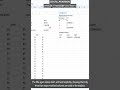 STATS_PEARSON one-sided less test in Sheets
 STATS_DESCRIPTIVE function — descriptive statistics in Google Sheets (ALS Stats reference)
 STATS_CI Function Reference – Confidence Intervals in Google Sheets (ALS Stats)
 STATS_KENDALL function reference in Google Sheets (ALS Stats add-on)
 STATS_ONE_SAMPLE Function Reference in Google Sheets | One-Sample t-Test Output
 STATS_PAIRED function reference | Paired t-test in Google Sheets (ALS Stats add-on)
 STATS_NORMALIZE function reference in Google Sheets (ALS Stats add-on)
 STATS_ALPHA Function Reference: Cronbach’s Alpha in Google Sheets (ALS Stats)
 One-sided greater STATS_INDEPENDENT t-test in Sheets
 STATS_DESCRIPTIVE mean and custom percentile in Sheets
 Hierarchical Linear Regression in Google Sheets (No SPSS Needed)
 STATS_FREQUENCIES regex score labels in Sheets
 STATS_DESCRIPTIVE weighted mean with w in Sheets
 Google Sheets Descriptive Statistics You Can Actually Defend
 STATS_BOOTSTRAP resamples (B) in Google Sheets
 STATS_RECODE Function Reference – Recode Values into Bins in Google Sheets
 STATS_FREQUENCIES Function Reference: Sheet Labels, String Columns, Custom Bands (ALS Stats)
 STATS_MA larger window moving average in Google Sheets
 STATS_BOOTSTRAP residual bootstrap in Google Sheets
 STATS_SPEARMAN Function Reference: Spearman Correlation Matrix in Google Sheets
