- Популярные видео
- Авто
- Видео-блоги
- ДТП, аварии
- Для маленьких
- Еда, напитки
- Животные
- Закон и право
- Знаменитости
- Игры
- Искусство
- Комедии
- Красота, мода
- Кулинария, рецепты
- Люди
- Мото
- Музыка
- Мультфильмы
- Наука, технологии
- Новости
- Образование
- Политика
- Праздники
- Приколы
- Природа
- Происшествия
- Путешествия
- Развлечения
- Ржач
- Семья
- Сериалы
- Спорт
- Стиль жизни
- ТВ передачи
- Танцы
- Технологии
- Товары
- Ужасы
- Фильмы
- Шоу-бизнес
- Юмор
Fix Battlefield REDSEC EA Javelin Anticheat Errors Encountered An Error(7/43/9/2/1053/1058)
How To Fix Battlefield REDSEC Error EA Javelin Anticheat Encountered An Error EAAntiCheat.GameService.exe (7) (9) (2) (1053/1058) (43)
Step 1) Relaunch the game multiple times, restart PC
Step 2) Repair/Uninstall & Reinstall EA AntiCheat
Install EA Anticheat From EA Website
https://help.ea.com/en/help/pc/ea-anticheat/
Step 3) Run EAAntiCheat.GameServiceLauncher.exe as an administrator
Step 4) Change language
Step 5) Add both BF6 and EAAntiCheat.GameServiceLauncher.exe to Exploit Protection.
Step 6) Disconnect internet, launch the game, once game is running, connect to the internet
Step 7) Turn off Smooth Motion in Nvidia App
Step 8) Delete Storage Pool, you will lose data present on the storage pool/storage space (Create a backup and do it at your own risk)
Visit Microsoft website for detail knowledge on Storage Pool
https://support.microsoft.com/en-us/windows/storage-spaces-in-windows-b6c8b540-b8d8-fb8a-e7ab-4a75ba11f9f2#WindowsVersion=Windows_11
Step 9) Close/Disable Daemon tools, disable it in device manager, uninstall daemon, you can reinstall in future, Close DS4 Windows, ReWASD ,AutoHotKey, JoyToKey, Razer Synapse, Corsair iCUE, Faceit Anti Cheat, Riot Vanguard, Belvedere, Logitech G Hub, EitherMouse app, Droptop via Rainmeter, GameCompanion app, Viveport/Vive's VR software also end these if present in task manager/disable these in device manager. Disable Xvdd SCSI Miniport, Corsair Bus in device manager, if not working uninstall these apps, Close all the third-party apps (VLC codec/wallpaper engine/MSI Apps etc.), disable/uninstall zapret app, CryptoPro, Punkbuster (PB) delete the punkbuster from every possible place on PC, close/uninstall goodbyedpi app, troubleshooting is not limited to these apps, if you have any third-party app/services running, close those apps, end its services in task manager and disable it in device manager if present
Step 10) Allow the game exe file to antivirus program (Avast, Norton, McAfee, bit defender, windhawk etc.)/Windows Security, allow BF6, EAAntiCheat.GameServiceLauncher.exe and EAAntiCheat.Installer.exe files
Step 11) Run the game as an administrator from the game installation folder, try compatibility mode, disable full screen optimization, run EAAntiCheat.GameServiceLauncher as an administrator
Step 12) Create a new admin local user account
Step 13) Check/Uncheck DLC
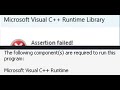
Step 14) Install Visual C++ Files
https:/docs.microsoft.com/en-US/cpp/windows/latest-supported-vc-redist?view=msvc-160
Step 15) Disable all mods before launching BF6, if using frostyfix disable all mods before running bf6
Step 16) Rename Battlefield 6 in documents folder, create a backup first (you will lose all the saved settings & save game progress)
Step 17) Update Windows
Step 18) Repair/Verify the game files on EA App/Steam/Epic Games Launcher
Step 19) Clear your Steam Cache
Step 20) Disconnect USB devices from PC (USB Flash Drive/Thumb Drive), Disconnect Razer Huntsman v3 pro/Keychron Keyboard or mouse, unplug the dongle,Unplug external devices such as hotas, pedals, racing wheel, Razer Tartarus, disconnect all the additional USB adapter connected to PC, disconnect headphones, Disconnect multiple monitor
Step 21) Steam users run EA app in the background, if already running close EA App
Step 22) Run EA App/Steam as an administrator, repair EA App
Step 23) Close Razer apps, do not overclock, set it to default, Close MSI Afterburner/rivatuner, disable overlay, close all the overlay apps (Discord, Nvidia App, Nvidia shadow play overlay, AMD overlay)
Step 24) Update BIOS
Step 25) Uninstall the game, go to the game installation folder and delete the game folder, restart your PC, and reinstall the game to C Drive/if already installed to C drive, then install the game to another SSD
Видео Fix Battlefield REDSEC EA Javelin Anticheat Errors Encountered An Error(7/43/9/2/1053/1058) канала AarohanTechSol
Step 1) Relaunch the game multiple times, restart PC
Step 2) Repair/Uninstall & Reinstall EA AntiCheat
Install EA Anticheat From EA Website
https://help.ea.com/en/help/pc/ea-anticheat/
Step 3) Run EAAntiCheat.GameServiceLauncher.exe as an administrator
Step 4) Change language
Step 5) Add both BF6 and EAAntiCheat.GameServiceLauncher.exe to Exploit Protection.
Step 6) Disconnect internet, launch the game, once game is running, connect to the internet
Step 7) Turn off Smooth Motion in Nvidia App
Step 8) Delete Storage Pool, you will lose data present on the storage pool/storage space (Create a backup and do it at your own risk)
Visit Microsoft website for detail knowledge on Storage Pool
https://support.microsoft.com/en-us/windows/storage-spaces-in-windows-b6c8b540-b8d8-fb8a-e7ab-4a75ba11f9f2#WindowsVersion=Windows_11
Step 9) Close/Disable Daemon tools, disable it in device manager, uninstall daemon, you can reinstall in future, Close DS4 Windows, ReWASD ,AutoHotKey, JoyToKey, Razer Synapse, Corsair iCUE, Faceit Anti Cheat, Riot Vanguard, Belvedere, Logitech G Hub, EitherMouse app, Droptop via Rainmeter, GameCompanion app, Viveport/Vive's VR software also end these if present in task manager/disable these in device manager. Disable Xvdd SCSI Miniport, Corsair Bus in device manager, if not working uninstall these apps, Close all the third-party apps (VLC codec/wallpaper engine/MSI Apps etc.), disable/uninstall zapret app, CryptoPro, Punkbuster (PB) delete the punkbuster from every possible place on PC, close/uninstall goodbyedpi app, troubleshooting is not limited to these apps, if you have any third-party app/services running, close those apps, end its services in task manager and disable it in device manager if present
Step 10) Allow the game exe file to antivirus program (Avast, Norton, McAfee, bit defender, windhawk etc.)/Windows Security, allow BF6, EAAntiCheat.GameServiceLauncher.exe and EAAntiCheat.Installer.exe files
Step 11) Run the game as an administrator from the game installation folder, try compatibility mode, disable full screen optimization, run EAAntiCheat.GameServiceLauncher as an administrator
Step 12) Create a new admin local user account
Step 13) Check/Uncheck DLC
Step 14) Install Visual C++ Files
https:/docs.microsoft.com/en-US/cpp/windows/latest-supported-vc-redist?view=msvc-160
Step 15) Disable all mods before launching BF6, if using frostyfix disable all mods before running bf6
Step 16) Rename Battlefield 6 in documents folder, create a backup first (you will lose all the saved settings & save game progress)
Step 17) Update Windows
Step 18) Repair/Verify the game files on EA App/Steam/Epic Games Launcher
Step 19) Clear your Steam Cache
Step 20) Disconnect USB devices from PC (USB Flash Drive/Thumb Drive), Disconnect Razer Huntsman v3 pro/Keychron Keyboard or mouse, unplug the dongle,Unplug external devices such as hotas, pedals, racing wheel, Razer Tartarus, disconnect all the additional USB adapter connected to PC, disconnect headphones, Disconnect multiple monitor
Step 21) Steam users run EA app in the background, if already running close EA App
Step 22) Run EA App/Steam as an administrator, repair EA App
Step 23) Close Razer apps, do not overclock, set it to default, Close MSI Afterburner/rivatuner, disable overlay, close all the overlay apps (Discord, Nvidia App, Nvidia shadow play overlay, AMD overlay)
Step 24) Update BIOS
Step 25) Uninstall the game, go to the game installation folder and delete the game folder, restart your PC, and reinstall the game to C Drive/if already installed to C drive, then install the game to another SSD
Видео Fix Battlefield REDSEC EA Javelin Anticheat Errors Encountered An Error(7/43/9/2/1053/1058) канала AarohanTechSol
Комментарии отсутствуют
Информация о видео
30 октября 2025 г. 6:37:37
00:20:32
Другие видео канала