
- Популярные видео
- Авто
- Видео-блоги
- ДТП, аварии
- Для маленьких
- Еда, напитки
- Животные
- Закон и право
- Знаменитости
- Игры
- Искусство
- Комедии
- Красота, мода
- Кулинария, рецепты
- Люди
- Мото
- Музыка
- Мультфильмы
- Наука, технологии
- Новости
- Образование
- Политика
- Праздники
- Приколы
- Природа
- Происшествия
- Путешествия
- Развлечения
- Ржач
- Семья
- Сериалы
- Спорт
- Стиль жизни
- ТВ передачи
- Танцы
- Технологии
- Товары
- Ужасы
- Фильмы
- Шоу-бизнес
- Юмор
Performance Monitoring in PAW | IBM Planning Analytics Tips & Tricks from Revelwood
Want better visibility into how your IBM Planning Analytics environment is performing?
In this Tips & Tricks video, Lee Lazarow, IBM Planning Analytics Practice Leader at Revelwood, walks through how to use Performance Monitoring in Planning Analytics Workspace to analyze system usage, identify large or inefficient cubes, and uncover opportunities for optimization.
You’ll learn how to:
- Enable Performance Monitor in Planning Analytics
- Access and interpret performance control cubes
- Use the }StatsByCube view to analyze memory usage
- Identify cubes impacted by data volume vs. calculations and feeders
- Take a proactive approach to system health checks and optimization
Whether you’re managing a growing Planning Analytics environment or conducting routine health checks, this tip gives you a practical starting point for performance analysis.
📌 Have questions or need help optimizing your environment?
Contact us at info@revelwood.com
Visit www.revelwood.com
🔔 Subscribe for more IBM Planning Analytics Tips & Tricks from Revelwood.
Видео Performance Monitoring in PAW | IBM Planning Analytics Tips & Tricks from Revelwood канала Revelwood
In this Tips & Tricks video, Lee Lazarow, IBM Planning Analytics Practice Leader at Revelwood, walks through how to use Performance Monitoring in Planning Analytics Workspace to analyze system usage, identify large or inefficient cubes, and uncover opportunities for optimization.
You’ll learn how to:
- Enable Performance Monitor in Planning Analytics
- Access and interpret performance control cubes
- Use the }StatsByCube view to analyze memory usage
- Identify cubes impacted by data volume vs. calculations and feeders
- Take a proactive approach to system health checks and optimization
Whether you’re managing a growing Planning Analytics environment or conducting routine health checks, this tip gives you a practical starting point for performance analysis.
📌 Have questions or need help optimizing your environment?
Contact us at info@revelwood.com
Visit www.revelwood.com
🔔 Subscribe for more IBM Planning Analytics Tips & Tricks from Revelwood.
Видео Performance Monitoring in PAW | IBM Planning Analytics Tips & Tricks from Revelwood канала Revelwood
IBM Planning Analytics Planning Analytics Workspace IBM PA Tips and Tricks IBM Planning Analytics Performance Monitoring Planning Analytics Performance Monitor Planning Analytics Workspace Tips IBM TM1 TM1 Performance Monitoring TM1 Workspace Planning Analytics Optimization Planning Analytics Health Check IBM Planning Analytics Cubes StatsByCube Planning Analytics Best Practices IBM Planning Analytics Training Revelwood Lee Lazarow FP&A Software
Комментарии отсутствуют
Информация о видео
5 января 2026 г. 20:54:02
00:04:52
Другие видео канала
 How a System Administrator Can Manage User Accounts with BlackLine
 Why People Choose Workday Adaptive Planning | FP&A Done Right - The Podcast Ep. 10
 Del caos a la claridad con Workday Adaptive Planning | Seminario Web de Revelwood
 Allocation Rules | Workday Adaptive Planning Tips & Tricks from Revelwood
 Calculating the Value & ROI of Automating FP&A with Workday Adaptive Planning | Revelwood Webinars
 File Manager | IBM Planning Analytics Tips & Tricks from Revelwood
 QUICK TAKES | Loading Subledger Data Directly Into a Reconciliation | BlackLine Demos by Revelwood
 Beyond the Numbers: Storytelling as a Finance Superpower | FP&A Done Right – The Podcast S2 Ep. 10
 Global Settings in Overview | IBM Planning Analytics Tips & Tricks from Revelwood
 DataMaestro | A New Vision for Data Orchestration | Revelwood Webinars
 Planning in Adaptive Insights | Adaptive Insights Demo by Revelwood
 How to Simplify Complex Consolidations with Fluence Technologies | Revelwood Webinars
 How to Use the Zoom Functionality in your PAW Visualizations for IBM Planning Analytics
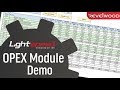 OpEX Module in Lightspeed | The Modules of Lightspeed
 Automating the Financial Close for Healthcare with BlackLine | Revelwood Webinars
 Cultivating Financial Resilience with Workday Adaptive Planning | Revelwood Webinars
 Improving Accounting Processes with BlackLine | Revelwood Webinars
 Add Additional Years Onto Your Time Strata | Workday Adaptive Planning Tips & Tricks from Revelwood
 Completing Accounting Tasks Faster with BlackLine | Revelwood Webinars
 Understanding the Migration from Legacy TM1 to Planning Analytics | Revelwood Webinars
 Using Words instead of Numbers | IBM Planning Analytics Tips & Tricks from Revelwood
