- Популярные видео
- Авто
- Видео-блоги
- ДТП, аварии
- Для маленьких
- Еда, напитки
- Животные
- Закон и право
- Знаменитости
- Игры
- Искусство
- Комедии
- Красота, мода
- Кулинария, рецепты
- Люди
- Мото
- Музыка
- Мультфильмы
- Наука, технологии
- Новости
- Образование
- Политика
- Праздники
- Приколы
- Природа
- Происшествия
- Путешествия
- Развлечения
- Ржач
- Семья
- Сериалы
- Спорт
- Стиль жизни
- ТВ передачи
- Танцы
- Технологии
- Товары
- Ужасы
- Фильмы
- Шоу-бизнес
- Юмор
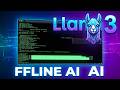
Local AI Power: Building a Personal AI Desktop Assistant with Llama 3
Howdy Fellas! 🤠 Welcome back to Metehan Software and AI! 🚀
In this third episode of our local AI series, we are shifting from text utilities to a fully functional productivity tool: We are building a Personal AI Desktop Assistant from scratch using Python and Llama 3 (8B) running 100% offline via Ollama.
Tired of sending your personal data, daily schedules, or private code snippets to cloud-based tools? Let's fix that. Today, we give our local machine its own private brain to handle daily developer tasks like email drafting and automated system log analysis. No API keys, no monthly fees, and total data privacy—running beautifully on my optimized CachyOS environment! 🐧
Grab your coffee, sit back, and enjoy this quiet, no-talking coding session. 💻🔥
---
### 📂 PROJECT ARCHITECTURE
han-assistant/
├── venv/
├── assistant.py
└── tasks/
├── draft_email.txt (Generated Output)
└── system_info.log (Input Context)
---
### 📄 SOURCE CODE (assistant.py)
import os
import json
import sys
import requests
OLLAMA_URL = "http://localhost:11434/api/generate"
def create_task_directory():
"""Automatically creates the folder where inputs and outputs are stored"""
if not os.path.exists("tasks"):
os.makedirs("tasks")
def read_local_file(filepath):
"""Gives the assistant the ability to read local files on your machine"""
try:
with open(filepath, "r", encoding="utf-8") as f:
return f.read()
except FileNotFoundError:
return f"[Error]: File not found at {filepath}"
def save_output(filename, content):
"""Gives the assistant the ability to save its work back to your disk"""
filepath = os.path.join("tasks", filename)
with open(filepath, "w", encoding="utf-8") as f:
f.write(content)
print(f"\n💾 [Saved]: Result written to {filepath}")
def ask_assistant(user_prompt, context_file=None):
print("🤖 [HAN Assistant]: Thinking...")
system_instruction = (
"You are 'HAN Assistant', a highly efficient local AI desktop companion for developers.\n"
"Your job is to help with file management, email drafting, and log analysis.\n"
"Be concise, professional, and directly deliver the required text or code."
)
file_content = ""
if context_file:
print(f"📖 [Reading File]: Loading context from {context_file}...")
file_content = f"\n\nContext from local file ({context_file}):\n{read_local_file(context_file)}"
full_prompt = f"{system_instruction}{file_content}\n\nUser Request: {user_prompt}"
payload = {
"model": "llama3",
"prompt": full_prompt,
"stream": False
}
try:
response = requests.post(OLLAMA_URL, json=payload)
if response.status_code == 200:
ai_response = response.json().get("response", "")
print("\n💡 [Assistant Response]:\n" + "_"*40 + f"\n{ai_response}\n" + "_"*40)
return ai_response
else:
print(f"❌ Error: Ollama returned status {response.status_code}")
return None
except Exception as e:
print(f"❌ Connection Error: Is Ollama running? ({e})")
return None
if __name__ == "__main__":
create_task_directory()
# --- SCENARIO 1: Email Drafting ---
prompt_1 = "Draft a professional, welcoming email to my team about our new AI Agent launch this week."
response_1 = ask_assistant(prompt_1)
if response_1:
save_output("draft_email.txt", response_1)
print("\n" + "="*50 + "\n")
# --- SCENARIO 2: System Log Analysis ---
log_data = "ERROR 2026-06-08 21:00:15 - Database connection failed on port 5432.\nWARNING - High memory usage detected."
with open("tasks/system_info.log", "w") as f: f.write(log_data)
prompt_2 = "Analyze this log file, explain what went wrong, and provide a 1-line bash command to check if that port is active."
response_2 = ask_assistant(prompt_2, context_file="tasks/system_info.log")
if response_2:
save_output("log_analysis.txt", response_2)
---
### 🚀 HOW TO SETUP & RUN
1. Make sure Ollama and Llama 3 are running locally:
ollama run llama3
2. Activate your environment (Fish Shell / CachyOS default):
source venv/bin/activate.fish
3. Install requirements:
pip install requests
4. Run the assistant:
python3 assistant.py
---
If you want to see more offline AI tools, automation scripts, and minimalist Linux setups, make sure to Like, Subscribe, and leave a comment below about what feature we should give our assistant next! 🛠️
#linux #cachyos #llama3 #ollama #python #aiassistant #codingasmr #notalking #backend #automation #aiagents #developer
Видео Local AI Power: Building a Personal AI Desktop Assistant with Llama 3 канала METEHAN SOFTWARE AND AI
In this third episode of our local AI series, we are shifting from text utilities to a fully functional productivity tool: We are building a Personal AI Desktop Assistant from scratch using Python and Llama 3 (8B) running 100% offline via Ollama.
Tired of sending your personal data, daily schedules, or private code snippets to cloud-based tools? Let's fix that. Today, we give our local machine its own private brain to handle daily developer tasks like email drafting and automated system log analysis. No API keys, no monthly fees, and total data privacy—running beautifully on my optimized CachyOS environment! 🐧
Grab your coffee, sit back, and enjoy this quiet, no-talking coding session. 💻🔥
---
### 📂 PROJECT ARCHITECTURE
han-assistant/
├── venv/
├── assistant.py
└── tasks/
├── draft_email.txt (Generated Output)
└── system_info.log (Input Context)
---
### 📄 SOURCE CODE (assistant.py)
import os
import json
import sys
import requests
OLLAMA_URL = "http://localhost:11434/api/generate"
def create_task_directory():
"""Automatically creates the folder where inputs and outputs are stored"""
if not os.path.exists("tasks"):
os.makedirs("tasks")
def read_local_file(filepath):
"""Gives the assistant the ability to read local files on your machine"""
try:
with open(filepath, "r", encoding="utf-8") as f:
return f.read()
except FileNotFoundError:
return f"[Error]: File not found at {filepath}"
def save_output(filename, content):
"""Gives the assistant the ability to save its work back to your disk"""
filepath = os.path.join("tasks", filename)
with open(filepath, "w", encoding="utf-8") as f:
f.write(content)
print(f"\n💾 [Saved]: Result written to {filepath}")
def ask_assistant(user_prompt, context_file=None):
print("🤖 [HAN Assistant]: Thinking...")
system_instruction = (
"You are 'HAN Assistant', a highly efficient local AI desktop companion for developers.\n"
"Your job is to help with file management, email drafting, and log analysis.\n"
"Be concise, professional, and directly deliver the required text or code."
)
file_content = ""
if context_file:
print(f"📖 [Reading File]: Loading context from {context_file}...")
file_content = f"\n\nContext from local file ({context_file}):\n{read_local_file(context_file)}"
full_prompt = f"{system_instruction}{file_content}\n\nUser Request: {user_prompt}"
payload = {
"model": "llama3",
"prompt": full_prompt,
"stream": False
}
try:
response = requests.post(OLLAMA_URL, json=payload)
if response.status_code == 200:
ai_response = response.json().get("response", "")
print("\n💡 [Assistant Response]:\n" + "_"*40 + f"\n{ai_response}\n" + "_"*40)
return ai_response
else:
print(f"❌ Error: Ollama returned status {response.status_code}")
return None
except Exception as e:
print(f"❌ Connection Error: Is Ollama running? ({e})")
return None
if __name__ == "__main__":
create_task_directory()
# --- SCENARIO 1: Email Drafting ---
prompt_1 = "Draft a professional, welcoming email to my team about our new AI Agent launch this week."
response_1 = ask_assistant(prompt_1)
if response_1:
save_output("draft_email.txt", response_1)
print("\n" + "="*50 + "\n")
# --- SCENARIO 2: System Log Analysis ---
log_data = "ERROR 2026-06-08 21:00:15 - Database connection failed on port 5432.\nWARNING - High memory usage detected."
with open("tasks/system_info.log", "w") as f: f.write(log_data)
prompt_2 = "Analyze this log file, explain what went wrong, and provide a 1-line bash command to check if that port is active."
response_2 = ask_assistant(prompt_2, context_file="tasks/system_info.log")
if response_2:
save_output("log_analysis.txt", response_2)
---
### 🚀 HOW TO SETUP & RUN
1. Make sure Ollama and Llama 3 are running locally:
ollama run llama3
2. Activate your environment (Fish Shell / CachyOS default):
source venv/bin/activate.fish
3. Install requirements:
pip install requests
4. Run the assistant:
python3 assistant.py
---
If you want to see more offline AI tools, automation scripts, and minimalist Linux setups, make sure to Like, Subscribe, and leave a comment below about what feature we should give our assistant next! 🛠️
#linux #cachyos #llama3 #ollama #python #aiassistant #codingasmr #notalking #backend #automation #aiagents #developer
Видео Local AI Power: Building a Personal AI Desktop Assistant with Llama 3 канала METEHAN SOFTWARE AND AI
Комментарии отсутствуют
Информация о видео
9 июня 2026 г. 18:55:41
00:10:43
Другие видео канала